


StormWatch+
3.333.00 Reviews
App Specs
- Version
- 8.2.2
- Updated On
- License
- Free
- Downloads
- 10,000+
- Developer
- Cirrus Weather Solutions, LLC
- Categories
- Weather
- Platform
- Android
Screenshots
 Analysis by AppCompare
When I’m deciding whether to carry an umbrella or change an outdoor plan, I want a weather app that gets me to the useful information quickly. StormWatch+ is a weather app from Cirrus Weather Solutions, LLC, and its storm-focused approach makes it most appealing when changing conditions matter more than decorative extras. I find it easiest to judge it as a practical companion: helpful for checking local conditions and keeping an eye on developing weather, but not a replacement for official emergency guidance.
Quick checks and speed expectations
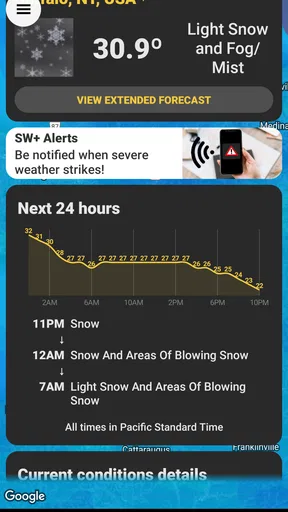
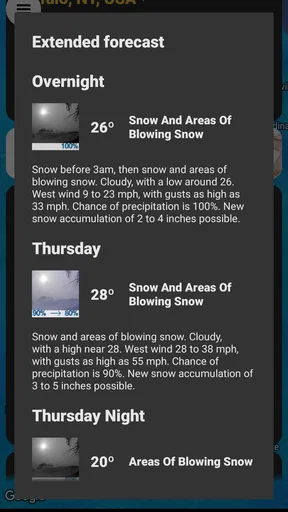
StormWatch+ is built around local weather, so the main benefit is having a place to check conditions for the area you care about rather than relying on a broad national forecast. In everyday use, that matters when I’m about to leave home, deciding whether to walk or drive, or checking whether an outdoor errand can wait. The interface feels aimed at getting into the forecast and radar without making me work through a complicated setup.
That simple layout also shapes what I expect from its speed. I don’t need a weather app to animate every screen; I need it to open, show useful information and let me inspect the radar without fuss. My experience with the app was smooth while moving between its sections, though actual loading can depend on connection quality and the availability of current weather information. If I’m somewhere with weak reception, I wouldn’t treat any radar view as a guaranteed live picture.
When weather checks become heavier use
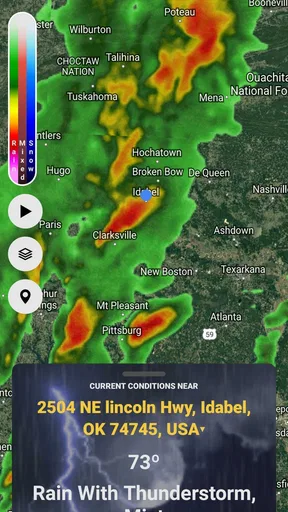
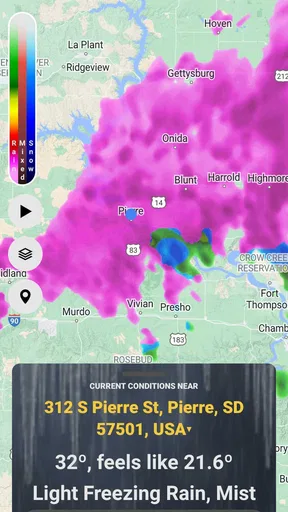
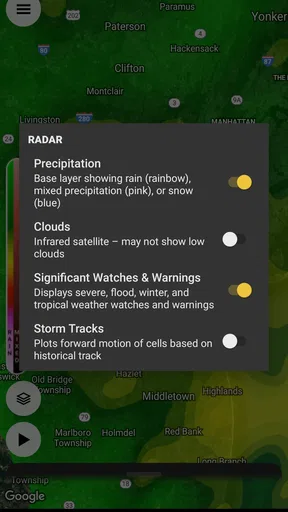
A quick glance is different from following a storm for an hour. When I’m watching radar while deciding whether to bring outdoor work inside, I’m asking more of the app: I may revisit it, adjust alert preferences and compare what I see with conditions outside. StormWatch+’s radar is useful for that kind of active check because it gives the weather more context than a single temperature or icon. It helps me think about whether a system appears to be approaching, rather than merely telling me that rain is possible.
One practical habit is to check the radar before leaving and then use alerts as a prompt to look again, instead of repeatedly keeping the app open. That can make a weather tool less distracting and avoid treating a map as a minute-by-minute promise. For a commute or a short trip, I’d pair the app’s local view with a quick look at the destination, since the conditions where I’m going may differ from those at home.
Reliability, alerts and sensible limits
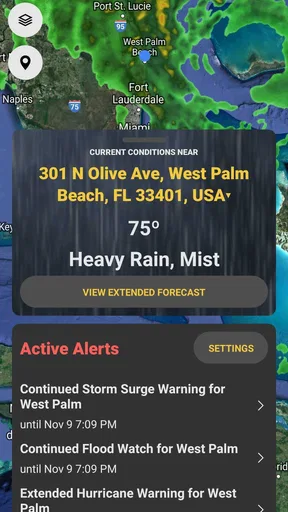
In my testing, alerts arrived in a timely way and I didn’t notice lag when moving around the app. That is reassuring, but weather changes quickly, and no phone forecast should be the only thing I rely on when a serious warning affects my area. I use notifications to bring important changes to my attention, then check the details and follow local emergency instructions when safety is involved.
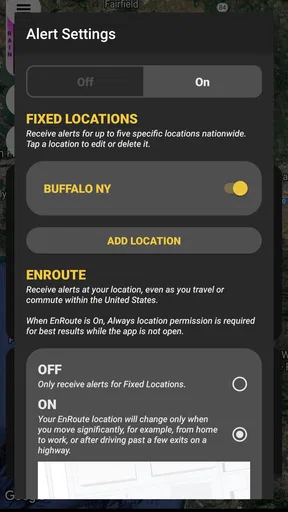
Customizable alerts are useful because not every user wants a notification for every change. I’d start with the conditions that would actually alter my plans, such as storms or temperature drops, and keep the alert choices focused. Too many notifications can train me to ignore them; a smaller set makes each one more meaningful. If I’m travelling, I’d also make sure I’m looking at the location that matters for the next leg of the trip rather than assuming a home-area alert covers the whole route.
Worth Reading Before You Choose

Baby Panda World Brings Quick Play to Modern Phones, but Its Game Library Feels Busy

ESPN’s Live Game View Makes Following Close Games Easier

QuizzLand Review: A Good Fit for Short Trivia Breaks, Not Every Player

Basketball Stars: Multiplayer Is Fast, but Can It Recover When Matches Go Wrong?

WEBTOON Turns Phone Updates Into a Better Reading Routine

Link to Windows Runs on Shared Habits, Not Social Feeds
Device fit and everyday trade-offs
The app is free to download, with optional in-app purchases ranging from $0.99 to $9.99 per item. Its age rating is Everyone, and the current version is 8.2.1, with Android 7.0 listed as the minimum operating system. Those details make it easier to judge whether it fits an older Android phone or a household device, but they don’t tell me how much battery or data any one person will use. I’d watch my own usage if I leave radar open for long stretches or have limited mobile data.
At a 3.4 average from around 60 ratings, the overall reception is mixed rather than universally glowing. It has more than 10,000 installs and around 30 written reviews, so I’d treat the rating as a reason to try it thoughtfully, not as proof that it will suit every weather routine. The app was released on March 22, 2020, and its current version shows that it has continued to receive version updates. I’d still check how it behaves on my device before making it my only source of weather information.
First Impressions and Interface
Right off the bat, StormWatch+ welcomes you with a clean and intuitive interface. The design is sleek, with a focus on functionality over frills, which I absolutely appreciate. It's one of those apps where you don't need a tutorial to start using it, which is a huge plus in my book.
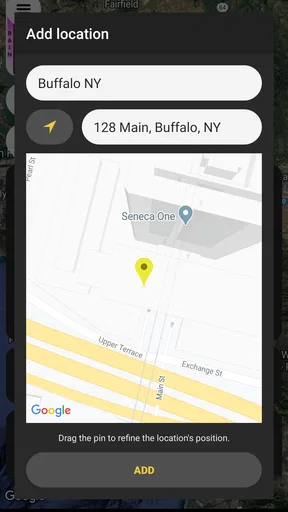
Upon opening the app, you're prompted to allow location access. This is crucial, as the app tailors its alerts and forecasts to your specific area. I found this feature really handy, especially when traveling and needing local weather updates without manually inputting locations.
Features Worth Noting
One of the standout features of StormWatch+ has to be its customizable alerts. You can set notifications for different weather conditions, making it super adaptable to your needs. For instance, if you're only interested in storm warnings or temperature drops, you can set it up just like that. No more irrelevant notifications clogging up your phone!
The app also boasts a detailed radar map, which is both visually pleasing and informative. It provides real-time data, showing you exactly what's happening in the atmosphere around you. I found this particularly useful when planning outdoor activities. You can literally watch the storm roll in!
Performance and Reliability
Performance-wise, StormWatch+ is pretty solid. During my testing, it consistently delivered timely alerts with no noticeable lag. The app runs smoothly, even when navigating through the radar map or switching between different sections.
Reliability is key for any weather app, and this one doesn’t disappoint. The alerts are accurate, and the forecasts are consistently updated. I compared it with other weather apps, and StormWatch+ held its own, often providing more detailed information.
User Experience and Community Feedback
What I really appreciate about StormWatch+ is its user-centric approach. The developers seem genuinely interested in feedback and regularly update the app to improve user experience. It’s always refreshing to see an app that listens to its community.
Browsing through user reviews, most folks echo my sentiments. They love the reliability and the peace of mind that comes with having accurate weather alerts at their fingertips. Of course, no app is perfect, and there are some users who wish for more detailed hourly forecasts. However, these seem to be in the minority.
Ending Thoughts
So, would I recommend StormWatch+? Absolutely. Whether you're someone who needs to stay on top of the weather for work or just want to avoid getting caught in a downpour, this app is a must-have. It’s reliable, user-friendly, and, most importantly, effective at what it does.
If you’re on the fence, I’d say give it a shot. With its customizable alerts and detailed radar, it’s like having a personal meteorologist in your pocket. So next time the skies look a bit ominous, you’ll be well-prepared, raincoat in hand!
Who benefits most from this setup
I’d recommend StormWatch+ first to someone whose plans are affected by nearby storms: a person who works outdoors, walks a dog on a schedule, coaches a field activity, or regularly decides whether to cycle or drive. Its combination of local forecasts, configurable notifications and radar makes it more useful for decisions than an app that only gives a daily high and a weather symbol. The value is not that it removes uncertainty; it gives me a reason to check conditions before committing to a plan.
A realistic example is a weekend yard project. I can check the local view before starting, look at the radar if clouds begin to build, and set only the alerts that would make me pack away tools. That workflow is more practical than leaving the screen open all afternoon. For someone who needs an exact hour-by-hour schedule for a tightly timed event, though, a service that emphasizes detailed hourly breakdowns may be a better primary choice.
Using radar without overreading it
A radar map is most useful when I treat it as context, not a guarantee. Before a drive, I’d look at the area around both my starting point and destination, then check again if the weather is changing. A snapshot can help me notice a developing pattern, but it cannot promise precisely when rain will reach one street or how severe conditions will be. That distinction matters especially when plans involve a long route or outdoor work that cannot be paused easily.
There is also a useful trade-off in keeping alerts selective. I’d choose notifications tied to decisions I would actually change, then leave less relevant conditions off. This reduces noise and makes it easier to respond when a meaningful alert arrives. If I’m visiting another town, I’d deliberately confirm that the app is showing the place I need; location-based convenience is helpful, but it is not a substitute for checking the selected area before relying on it.
How it compares with familiar weather apps
Many general-purpose weather apps are designed to answer a broad set of questions, from the day’s temperature to extended forecasts and lifestyle details. StormWatch+ feels more compelling when the question is narrower: what is happening locally, and should I pay closer attention to storm conditions? Its radar and alert customization give it a more active, watchful role than a basic forecast screen. I would keep a general weather service in the mix if I depend on extensive hourly planning or want a wider range of everyday forecast views.
Compared with checking a browser forecast, a dedicated app can make repeat checks and notifications more convenient. The trade-off is that any app can encourage overconfidence if I mistake a polished map for certainty. For severe weather, I would use StormWatch+ as an extra layer of awareness and follow official local warnings and instructions. It is a sensible companion, not an emergency authority.
Stability, battery and recovery expectations
I found navigation responsive during my use, but I would not turn that into a promise about every phone or network. Radar-heavy use naturally involves more screen time and repeated updates than a one-time forecast check, so on an older device or a limited data plan I’d use it deliberately: open the map when a decision is near, inspect what I need, then close it. That is a practical way to avoid needless background attention without assuming any particular battery impact.
If the app appears slow or a map does not refresh, I’d first check whether the connection is working and whether the correct location is selected, then try reopening the screen. Those are ordinary troubleshooting steps rather than a claim that StormWatch+ has a special recovery feature. When the information matters for safety, I would cross-check through a trusted local source instead of repeatedly refreshing one screen and assuming the latest display must be complete.
When I would choose something else
I would skip StormWatch+ as my main weather tool if I rarely need storm alerts, prefer a forecast packed with detailed hourly planning, or want a single app to cover many unrelated travel and lifestyle needs. Someone who dislikes notifications may also find its strongest practical advantage less relevant, since alerts are most useful when they are enabled and tuned to personal priorities. A simpler forecast app could be a better fit for checking the temperature once in the morning.
For people who do care about local storm awareness, the free entry point makes it easy to test whether its layout and alert approach suit their routine. Optional purchases are available, so I’d review any purchase choice carefully and decide based on what I actually use rather than assuming every feature needs to be unlocked. The mixed average rating is another reason to approach it as a personal fit question: install it, check the areas and alerts that matter, and see whether it earns a place in your daily routine.
My performance verdict
My overall impression is of a focused weather app that feels responsive in ordinary navigation and is most valuable when radar and selected alerts help me make a timely decision. I would not judge it by whether it can eliminate every surprise; weather information always has limits, and phone performance varies with device and connection. The strongest approach is to use it for local awareness, keep notifications relevant, and cross-check serious situations with official guidance.
If your usual weather routine is a quick temperature glance, StormWatch+ may offer more than you need. If you often plan around changing conditions and want a radar view plus adjustable alerts in one place, it is worth trying. I like it best as a practical second set of eyes: useful before a commute, a walk, or outdoor work, while leaving room for another forecast source when detailed scheduling or emergency decisions call for it.
Pros
- Accurate severe weather alerts.
- Customizable notification settings.
- Detailed radar and map features.
- User-friendly interface.
- Minimal battery consumption.
Cons
- Limited free features available.
- Occasional notification delays.
- Requires constant internet connection.
- Ads in the free version.
- Subscription needed for full access.
FAQs for StormWatch+
What features does StormWatch+ offer for weather monitoring?
StormWatch+ provides real-time weather alerts, radar imagery, and detailed weather forecasts. It includes customizable alerts for severe weather events and integrates with GPS to provide location-specific updates. The app also offers a user-friendly interface that allows users to track storms and receive updates on changing weather conditions.
How accurate are the weather alerts provided by StormWatch+?
StormWatch+ utilizes advanced meteorological data from trusted sources to ensure high accuracy in weather predictions. The app offers real-time updates and customizable alerts to keep users informed about severe weather conditions, ensuring they receive timely notifications tailored to their specific location.
Is StormWatch+ available on both Android and iOS platforms?
Yes, StormWatch+ is available for download on both Android and iOS devices. The app can be found on the Google Play Store and the Apple App Store, ensuring compatibility across a wide range of smartphones and tablets, and providing users with flexibility in their choice of platform.
Does StormWatch+ offer any subscription services or in-app purchases?
While StormWatch+ offers a range of free features, it also provides a premium subscription service that unlocks additional functionalities. These may include enhanced radar features, ad-free usage, and more detailed weather forecasts. Users can choose to upgrade within the app to enhance their weather monitoring experience.
How user-friendly is the StormWatch+ interface for beginners?
StormWatch+ is designed with a clean and intuitive interface, making it accessible even for users who are new to weather apps. The app provides clear instructions and easy-to-navigate menus, ensuring that users can quickly set up alerts and access the information they need without any hassle.


